Viq
Video Queuing Analysis Tool
Table of Contents
1. Quickstart
Start a Viq receiver:
viq receiver \
    --initial-queue-depth 1 `# wait for 1 frame then start streaming`\
    --fps 20                `# pull frames at 20 FPS`
And afterwards, start a Viq sender:
viq sender localhost:4462 \
    --fps 20              `# push frames at 20 FPS`\
    --i-period 20         `# one I-frame every 1 second`\
    --i-size-multiplier 5 `# I-frames are 5x larger than P-frames`\
    --bitrate 3.5M        `# I-frames & P-frames average out to 3.5Mbps`
2. Web GUI
Viq comes bundled with a web GUI. Whenever a viq receiver command is executed,
Viq prepares a local webserver and tries to launch a browser window pointing at
that webserver.
When traffic from viq sender starts, it gets displayed in real time on the
GUI.
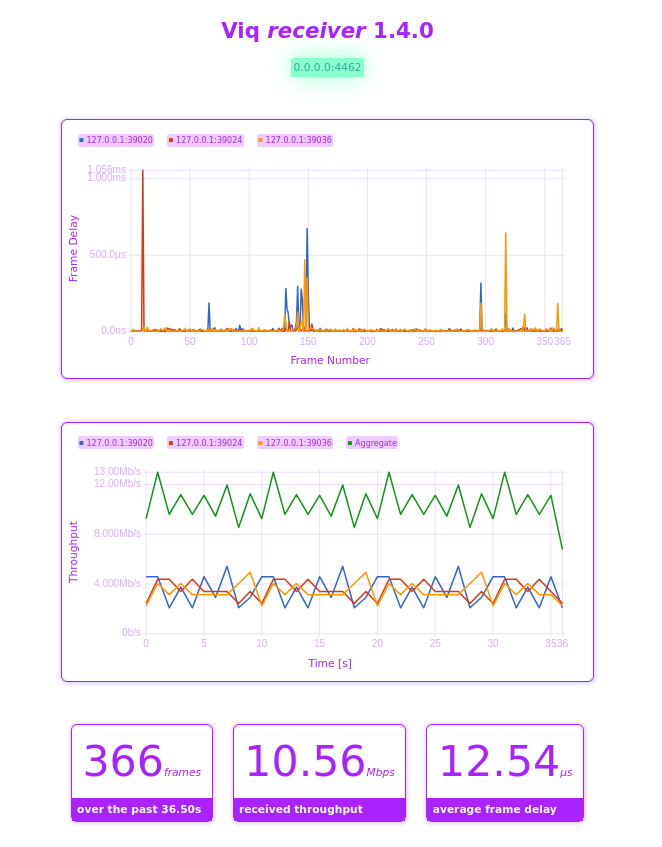
Figure 1: Viq’s GUI can be used to quickly iterate and identify problematic network or video configurations.
2.1. Frame Delay Plot
The frame delay plot helps identify late frames. It is also split per stream so problems with specific streams can be identified.
2.2. Received Throughput Plot
The received throughput plot helps correlate any issues with frame timing observed with the received throughput around the same time.
When sending traffic over the loopback interface, it’s also very useful for validating traffic pattern scripts have the expected behavior.
2.3. Configuration
The configuration for the receiver can be changed by clicking the gear icon on the top right. This will re-start the receiver with the new settings.
3. Wireshark Decoding
The release package includes a viq.lua Wireshark plugin that can be installed
and used for observing the timing of actual networking traffic and identifying
the cause of frame delays seen in the Viq receiver.
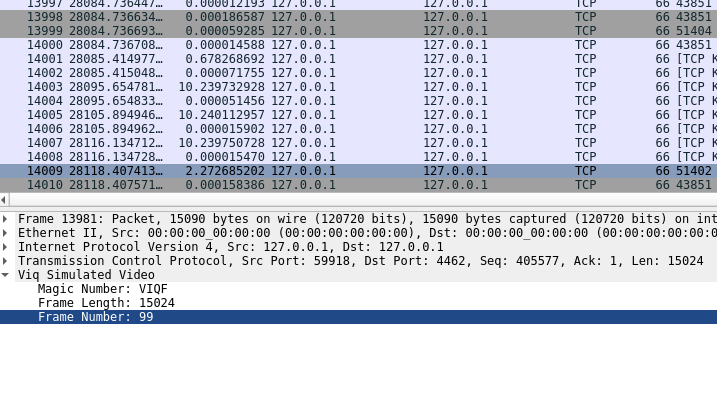
Figure 2: A Viq video frame decoded in Wireshark. The length and frame number are made available for analysis.
4. Output Format
The output from viq receiver is formatted as CSV, with the following columns:
- Stream ID: 0-indexed counter, incremented per-stream.
DELAYEDorONTIMEframe: did the frame arrive before the presentation deadline?- Frame number.
- Frame size in bytes.
- Time since stream start, in nanoseconds.
- How long after the frame deadline did the frame actually get displayed, in nanoseconds.
4.1. Example
0,ONTIME,1,32012,150,300
0,ONTIME,2,21341,50000048,118
...
0,DELAYED,14,21341,650197058,197088
0,ONTIME,15,21341,700000049,109
5. Comprehensive Parameter Sweeps
Shell scripts for comprehensive sweeping are available.
Start on the receiver device:
scripts/sweep-receiver.sh | tee test-output.csv
And the on the sender device:
scripts/sweep-sender.sh
6. Units
Viq can use both decimal or binary unit multipliers. It uses decimal units by default:
| Unit | Value |
|---|---|
| K | 103 |
| M | 106 |
| G | 109 |
The --binary-units option can be used to switch to binary units:
| Unit | Value |
|---|---|
| K | 210 |
| M | 220 |
| G | 230 |
All throughput values are in bits.
7. Frame Size Tables
Frame size tables are on of the core concepts in Viq. They define a schedule by which Viq decides the sizes of individual video frames to be sent over the network.
There are three ways of specifying frame size tables in Viq:
- Model Frame Tables
- File Frame Tables
- Scripted Frame Tables
7.1. Model Frame Tables
Model frame tables use the following equation to define the size of I-frames (key-frames) and P-frames (in-between frames).
Pframe = --i-period × --bitrate --i-period + --i-size-multiplier - 1
Iframe = --i-size-multiplier × Pframe
Model tables also produce I-frames at specifically the rate specified by --i-period.
--i-index can be used to specify when in the stream the first I-frame will be
added. This is especially useful when de-synchronizing multiple streams for more
realistic simulation of multiple Viq senders.
7.2. File Frame Tables
Frame sizes can be sourced directly from a file with --frame-table. The frame
sizes are specified each in one line. Once Viq depletes lines in the file, it
will loop over and start again, repeating the pattern. The values in the file
are unitless, representing only the relative size between the frames.
--bitrate will be respected and specify the maximum throughput generated
over 1s by a particular file.
For example, to simulate a system with I-frames 5 times larger than P-frames, and one I-frame generated every 5 frames, we can use:
1
.2
.2
.2
.2
1
.2
.2
.2
.2
File frame tables are, however, more useful when simulating out-of-schedule I-frames, or variable bitrates.
7.3. Scripted Frame Tables
By passing --script-frame-table pointing to a file, we can also
programatically define the relative frame sizes, still with the total average
bitrate controlled by --bitrate.
Here we have an example for generating a sequence of length 2x FPS where the
first frame is 5x larger than all other frames. The sequence will automatically
repeat for --frames.
0..2*fps
  .each |i| match i
              0 then 5
              else 1
See the Koto tutorial for more details on the Koto language.
8. Rationale
8.1. Objectives
Viq is a tool for comprehensive analysis of network quality for video systems.
We specifically target:
- Wireless networks.
- Fixed-framerate systems.
- Fixed-bitrate systems.
- Multiple-sources systems.
8.2. Challenges
“Video” is not a uniform concept. There are many different transport, encapsulation, and compression protocols and codecs available, and each will produce a bitstream with different characteristics, and fail in different ways.
Viq attempts to abstract away all video-specific aspects and instead produce data that broadly describes the behavior of any video system over the entire possible parameter space for video systems.
8.3. Viq Video Model
Viq’s video model simplifies video transmission to the transfer of frames from one host to another, at fixed well timed intervals.
Analysis of quality centers around identifying the required queue depth for reliable video streaming in a given network configuration.
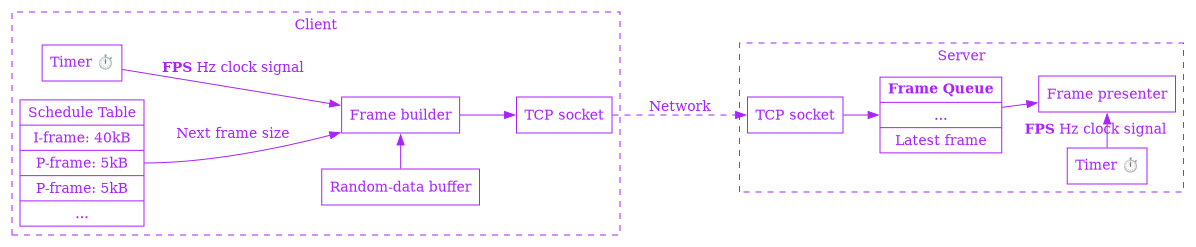
Figure 3: The Viq video model